
WIRELESS CLIP-ON HEADSET HS-21W - Wireless Earbuds NOKIA - Free user manual and instructions
Find the device manual for free WIRELESS CLIP-ON HEADSET HS-21W NOKIA in PDF.


| Brand | NOKIA |
| Model | WIRELESS CLIP-ON HEADSET HS-21W |
| Product type | Wireless clip-on headset |
| Wireless technology | Bluetooth 1.1 |
| Supported Bluetooth profiles | Headset profile 1.1, Hands-free profile 1.0 |
| Bluetooth range | Up to 10 meters |
| Battery type | Rechargeable LiPo |
| Compatible chargers | AC-1, ACP-12, LCH-12 |
| Full charging time | Up to 2 hours |
| Talk time | Up to 7 hours |
| Standby time | Up to 180 hours |
| Key features | Answer/end call, call rejection, voice dialing, redial, volume adjustment, mute, call transfer between headset and phone |
| Indicator light | Red LED (charging), green LED (charged, connected) |
| Keys | Power on/off, answer/end, volume up/down |
| Number of pairable devices | Up to 8 phones |
| Reset | Hold Power on/off and Volume up keys for 10 seconds |
| Care and cleaning | Clean with a soft dry cloth, do not use chemicals |
| Safety | Do not expose to moisture, do not open, use only Nokia-approved accessories |
| Spare parts and repairability | User-replaceable battery. For repairs, contact an authorized service center. |
| General information | Complies with directive 1999/5/EC. Copyright © 2004 Nokia. |
Frequently Asked Questions - WIRELESS CLIP-ON HEADSET HS-21W NOKIA
User questions about WIRELESS CLIP-ON HEADSET HS-21W NOKIA
0 question about this device. Answer the ones you know or ask your own.
Ask a new question about this device
Download the instructions for your Wireless Earbuds in PDF format for free! Find your manual WIRELESS CLIP-ON HEADSET HS-21W - NOKIA and take your electronic device back in hand. On this page are published all the documents necessary for the use of your device. WIRELESS CLIP-ON HEADSET HS-21W by NOKIA.
USER MANUAL WIRELESS CLIP-ON HEADSET HS-21W NOKIA
User Guide for the Wireless Clip-on Headset (HS-21W)
9236329
Issue 1
DECLARATION OF CONFORMITY
We, NOKIA CORPORATION declare under our sole responsibility that the product HS-21W is in conformity with the provisions of the following Council Directive: 1999/5/EC. A copy of the Declaration of Conformity can be found at http://www.nokia.com/phones/declaration_of_conformity/.
C€0682
Copyright © 2004 Nokia. All rights reserved.
Reproduction, transfer, distribution or storage of part or all of the contents in this document in any form without the prior written permission of Nokia is prohibited.
Nokia and Nokia Connecting People are registered trademarks of Nokia Corporation. Other product and company names mentioned herein may be trademarks or tradenames of their respective owners.
Bluetooth is a registered trademark of Bluetooth SIG, Inc.
Nokia operates a policy of continuous development. Nokia reserves the right to make changes and improvements to any of the products described in this document without prior notice.
Under no circumstances shall Nokia be responsible for any loss of data or income or any special, incidental, consequential or indirect damages howsoever caused.
The contents of this document are provided "as is". Except as required by applicable law, no warranties of any kind, either express or implied, including, but not limited to, the implied warranties of merchantability and fitness for a particular purpose, are made in relation to the accuracy, reliability or contents of this document. Nokia reserves the right to revise this document or withdraw it at any time without prior notice.
The availability of particular products may vary by region. Please check with the Nokia dealer nearest to you.
There may be restrictions on using Bluetooth technology in some locations. Check with your local authorities or service provider.
Unauthorized changes or modifications to this device may void the user's authority to operate the equipment.
This device may contain commodities, technology or software subject to export laws and regulations from the US and other countries. Diversion contrary to law is prohibited.
9236329
Issue 1
Contents
- Introduction 6
Bluetooth wireless technology 6
- Getting started.... 8
Overview....9
Chargers and batteries.... 12
Removing and installing the battery.... 12
Charging the battery 15
Switching the headset on or off.... 17
Pairing the headset with a compatible phone 17
Disconnecting the headset.... 19
Connecting the paired headset.... 20
Troubleshooting.... 20
- Using the headset.... 22
Making a call 23
Redialing the last dialed number 23
Voice dialing.... 23
Answering and ending a call 24
Rejecting a call.... 24
Automatic answer 24
Adjusting the earphone volume 25
Muting a call.... 25
Switching the call between phone and headset 25
Using the headset with several phones.... 26
Resetting the headset 27
- Battery information.... 28
Care and maintenance.... 31
1. Introduction
The Wireless Clip-on Headset HS-21W can be connected to a compatible mobile phone that supports Bluetooth wireless technology. This allows you freedom to make and receive calls while on the move or in the office.
Read this user guide carefully before using the headset. In addition to this user guide, read also the user guide for your phone, which provides important safety and maintenance information. Keep the headset out of reach of small children.
Bluetooth wireless technology
The Bluetooth wireless technology makes it possible to connect compatible communication devices without using cables. A Bluetooth connection does not require that the phone and the headset be in line of sight, but both devices
should be within 10 meters of each other. Connections can be subject to interference from obstructions, such as walls, or other electronic devices.
The HS-21W headset is specially designed for compatible Nokia mobile phones that support Bluetooth wireless technology. The headset can, however, be used with any compatible devices that support the compatible Handsfree or Headset profiles. (Here, a profile is a set of Bluetooth wireless technology commands that the phone uses to control the headset).
The HS-21W headset is compliant with the Bluetooth Specification 1.1 supporting the following profiles: Headset Profile 1.1, Handsfree Profile 1.0. However, interoperability between the HS-21W headset and other Bluetooth-enabled products is not guaranteed because it depends on compatibility. Check with the manufacturers of other devices to determine their compatibility with this device.
2. Getting started
Note that there may be restrictions using Bluetooth wireless technology in some locations. Check with your local authorities or service provider.
Overview
The headset contains the following parts, as shown in Figure 1.
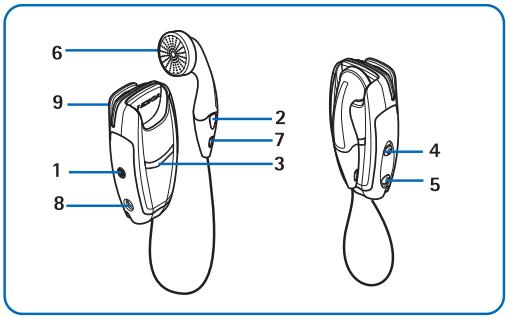
Figure 1

Note: Parts of the headset are magnetic. Metallic materials may be attracted to the headset, and persons with a hearing aid or a pacemaker should not hold the headset to the ear with the hearing aid or close to the pacemaker. Always secure the ear piece in its holder, because materials may be attracted by the earpiece. Do not place credit cards or other magnetic storage media near the headset, because information stored on them may be erased.
Power key (1): Switches the headset on and off. Press the power key briefly to mute or unmute the ongoing call.
Answer/end key (2): Answers or ends the call. This key can also be used for voice dialing, redialing, and switching an active call between the headset and the compatible phone.
Indicator light (3): Displays the current status of the headset.
Volume up (4): Increases the earphone volume during a call.
Volume down (5): Decreases the earphone volume during a call.
Earphone (6): Relays the caller's voice.
Microphone (7): Picks up your voice.
Charger connector (8)
Battery cover (9)
Before you can start using the headset, you must do the following:
• Install and charge the battery.
- Pair a compatible phone with the headset.
Chargers and batteries
Check the model number of any charger before using it with this device. The headset HS-21W is intended for use with the following chargers: AC-1, ACP-12, and LCH-12.

Warning: Use only batteries and chargers approved by Nokia for use with this particular enhancement. The use of any other types may invalidate any approval or warranty, and may be dangerous.
For availability of approved enhancements, please check with your dealer. When you disconnect the power cord of any enhancement, grasp and pull the plug, not the cord.
■ Removing and installing the battery
Before removing the back cover, always switch off the power, and disconnect the charger from the device. Always store and use the device with the back cover attached.
The headset has a rechargeable LiPo battery. To change it:
-
To open the battery cover, gently push the release button and slide the battery cover backwards. See Figure 2.1.
-
Remove the battery. See Figure 2.2.
-
Detach the connector from its space, and detach the battery from the connector. See Figure 2.3.
-
Replace the battery. Place the connector in the space reserved for it, and set the battery in place. See Figure 2.4.
-
Close the battery cover. See Figure 2.5.
Getting started
- Make sure that the cover is properly locked in place. See Figure 2.6.
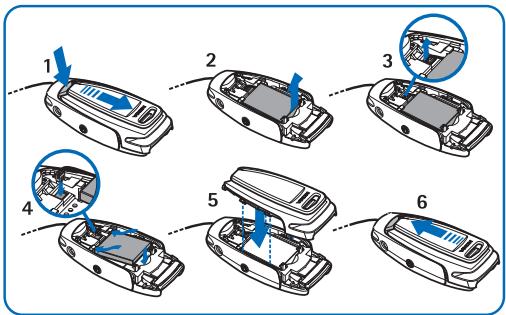
Figure 2
Charging the battery
- Connect the charger cable to the headset as shown in Figure 3.
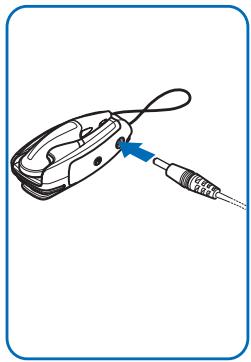
Figure 3
Getting started
- Connect the charger to a wall outlet. The red indicator light is displayed during charging. If the battery is completely discharged, it may take a few minutes before the red indicator is shown. Charging the battery fully may take up to 2 hours depending on the charger.
- When the battery is fully charged, the green indicator light is displayed. Disconnect the charger from the wall outlet and the headset.
The fully charged battery has power for up to 7 hours of talk-time or up to 180 hours of standby time. (In the standby mode, the paired headset is switched on but no call is in progress.)
When the battery is running out of power, the headset beeps, and the red indicator light starts to blink. Charge the battery as described above.
■ Switching the headset on or off
To switch on, press and hold the power key for 2 seconds. The headset beeps and the green indicator light starts blinking fast. The blinking continues slower after the headset is connected to your phone.
To switch off, press and hold the power key for 2 seconds. The headset beeps, and the red indicator light is displayed briefly.
■ Pairing the headset with a compatible phone
- Switch on your phone.
- Switch on the headset.
- Enter the Bluetooth menu of your phone, and make sure that the Bluetooth feature is activated.
- Enter the submenu where you can set the phone to search for Bluetooth devices, and start the search.
Getting started
- Select the headset from the list.
- Enter the passcode 0000 to associate ("pair") and connect the headset to your phone. In some phones you may need to make the connection separately. See the user guide of your phone for details.
Once you have entered the passcode, your phone becomes the default phone for the headset, if the headset was not previously paired with another phone. See also "Using the headset with several phones" on page 26.
The headset beeps and appears in the phone menu where you can view the Bluetooth devices that are currently paired with your phone.
- Start using the headset (see page 22).
Disconnecting the headset
You can disconnect the headset from your phone when, for example, you want to connect another device with your phone using the Bluetooth wireless technology.
The headset can be disconnected in the following ways:
- Switch off the headset.
- Disconnect the headset in the Bluetooth menu of your phone.
- Move the headset more than 10 meters away from the phone.
The headset is also disconnected if its battery becomes discharged.
Note that you do not need to delete the pairing with the headset to disconnect it. When you reconnect a paired headset, you are not asked for its passcode.
Connecting the paired headset
To connect the headset to your phone, switch on the headset, make the connection in the Bluetooth menu of your phone, or press and hold the answer/end key of the headset.
You can set your phone to accept Bluetooth connection requests from your paired headset. In this case, the headset can connect to your phone automatically when it is switched on. In Nokia phones this can be done by changing your paired devices settings in the Bluetooth menu.
Troubleshooting
If you cannot connect the headset to your phone, do as follows:
- Make sure that the headset is charged, switched on (the green indicator light blinks) and paired with your phone.
- Make sure that the Bluetooth feature is activated on your phone.
- Check that the headset is within 10 meters of your phone and that there are no obstructions between the headset and the phone, such as walls or other electronic devices.
- Check the pairing information list of the headset; it may be full. The headset can store the information of up to eight phones at a time. If the list becomes full, reset the headset to the original settings (see page 27).
- If the headset does not automatically reconnect to the default or last used phone, press and hold the answer/end key for 2 seconds.
3. Using the headset
Carry the headset by attaching it to your clothing as shown in Figure 4, or wear it around your neck using the neck strap as shown in Figure 5. When you do not use the headset, you can wind the earphone wire around the headset as shown in Figure 6.
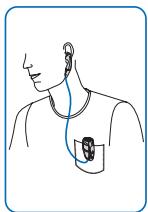
Figure 4
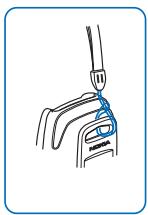
Figure 5
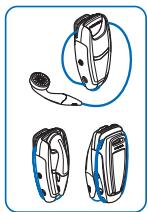
Figure 6
Making a call
When the headset is connected to your phone, make a call by using your phone in the normal way.
■ Redialing the last dialed number
Press the answer/end key twice briefly when no call is in progress.
Voice dialing
This function is only available if your phone supports voice dialing. When no call is in progress, press and hold the answer/end key for 2 seconds, and proceed as described in the user guide of your phone.
■ Answering and ending a call
Press the answer/end key to answer the call or to end the currently active call. You can also answer or end the call by using your phone in the normal way.
Rejecting a call
If you do not want to answer a call, briefly press the answer/end key twice.
■ Automatic answer
If the automatic answer function is set on in your phone, the phone automatically answers the incoming call after one ring.
■ Adjusting the earphone volume
Press the volume up key to increase or the volume down key to decrease the volume. To adjust the volume quickly, press and hold either of these keys for 2 seconds.
■ Muting a call
You can mute or unmute the ongoing call by pressing the power key briefly.
■ Switching the call between phone and headset
You can switch the active call between the headset and a compatible Nokia phone.
To switch the call from the headset to a phone and vice versa, press and hold the answer/end key for 2 seconds, or use the respective function in your phone.
■ Using the headset with several phones
The headset can be paired with up to eight phones but connected to only one phone at a time.
The phone that was first paired with the headset is called the default phone. The phone that was last used with the headset is called the last used phone.
If the headset is switched on within 10 meters of several paired phones, the headset will try to connect to the default phone within a few seconds.
If the headset cannot connect to the default phone (for example, when it is switched off or its user rejects the connection), the headset tries to connect to the last used phone within a few seconds. If the headset cannot connect to either of the phones, it remains discoverable for other phones.
If you want to use the headset with a paired phone that is not a default phone or last used phone, make the connection in the Bluetooth menu of your phone.
■ Resetting the headset
You can reset the headset to its original settings (for example, to change the default user of the headset). When you reset the headset, all of its settings, including pairing information, are cleared.
To reset the headset, press and hold the power key and the volume up key for 10 seconds. After the headset has been reset, it beeps twice, and the red and the green indicator lights alternate for several seconds.
4. Battery information
Your device is powered by a rechargeable battery. The full performance of a new battery is achieved only after two or three complete charge and discharge cycles. The battery can be charged and discharged hundreds of times but it will eventually wear out. When the talk and standby times are noticeably shorter than normal, buy a new battery. Use only Nokia approved batteries, and recharge your battery only with Nokia approved chargers designated for this device.
Unplug the charger from the electrical plug and the device when not in use. Do not leave the battery connected to a charger. Overcharging may shorten its lifetime. If left unused, a fully charged battery will lose its charge over time. Temperature extremes can affect the ability of your battery to charge.
Use the battery only for its intended purpose. Never use any charger or battery that is damaged.
Do not short-circuit the battery. Accidental short-circuiting can occur when a metallic object such as a coin, clip, or pen causes direct connection of the positive (+) and negative (-) terminals of the battery. (These look like metal strips on the battery.) This might happen, for example, when you carry a spare battery in your pocket or purse. Short-circuiting the terminals may damage the battery or the connecting object.
Leaving the device in hot or cold places, such as in aclosed car in summer or winter conditions, will reduce the capacity and lifetime of the battery. Always try to keep the battery between 15°C and 25°C (59°F and 77°F). A device with a hot or cold battery may not work temporarily, even when the battery is fully charged. Battery performance is particularly limited in temperatures well below freezing.
Battery information
Do not dispose of batteries in a fire! Dispose of batteries according to local regulations. Please recycle when possible. Do not dispose as household waste.
Care and maintenance
Your device is a product of superior design and craftsmanship and should be treated with care. The suggestions below will help you protect your warranty coverage.
- Keep all accessories and enhancements out of the reach of small children.
- Keep the device dry. Precipitation, humidity and all types of liquids or moisture can contain minerals that will corrode electronic circuits. If your device does get wet, remove the battery and allow the device to dry completely before replacing it.
- Do not use or store the device in dusty, dirty areas. Its moving parts and electronic components can be damaged.
- Do not store the device in hot areas. High temperatures can shorten the life of electronic devices, damage batteries, and warp or melt certain plastics.
Care and maintenance
- Do not store the device in cold areas. When the device returns to its normal temperature, moisture can form inside the device and damage electronic circuit boards.
- Do not attempt to open the device other than as instructed in this guide.
- Do not drop, knock, or shake the device. Rough handling can break internal circuit boards and fine mechanics.
- Do not use harsh chemicals, cleaning solvents, or strong detergents to clean the device.
- Do not paint the device. Paint can clog the moving parts and prevent proper operation.
All of the above suggestions apply equally to your device, battery, charger, or any enhancement. If any device is not working properly, take it to the nearest authorized service facility for service.
- USER GUIDE FOR THE WIRELESS CLIP-ON HEADSET (HS-21W)
- DECLARATION OF CONFORMITY
- C€0682
- CONTENTS
- INTRODUCTION
- BLUETOOTH WIRELESS TECHNOLOGY
- GETTING STARTED
- OVERVIEW
- CHARGERS AND BATTERIES
- REMOVING AND INSTALLING THE BATTERY
- CHARGING THE BATTERY
- SWITCHING THE HEADSET ON OR OFF
- PAIRING THE HEADSET WITH A COMPATIBLE PHONE
- DISCONNECTING THE HEADSET
- CONNECTING THE PAIRED HEADSET
- TROUBLESHOOTING
- USING THE HEADSET
- MAKING A CALL
- REDIALING THE LAST DIALED NUMBER
- VOICE DIALING
- ANSWERING AND ENDING A CALL
- REJECTING A CALL
- AUTOMATIC ANSWER
- ADJUSTING THE EARPHONE VOLUME
- MUTING A CALL
- SWITCHING THE CALL BETWEEN PHONE AND HEADSET
- USING THE HEADSET WITH SEVERAL PHONES
- RESETTING THE HEADSET
- BATTERY INFORMATION
- CARE AND MAINTENANCE
Brand : NOKIA
Model : WIRELESS CLIP-ON HEADSET HS-21W
Category : Wireless Earbuds